-

LTCN CAR PLATE User Guide: License Plate Recognition and Access Control
Connect a license plate camera to Home Assistant with LTCN CAR PLATE. This illustrated guide covers camera setup, HTTP event delivery, vehicle authorization, passage records, scene rules, relay conditions and device settings.
-
LTCN MUSIC User Guide: Music Library and Multi-Speaker Playback
Use LTCN MUSIC in Home Assistant to manage local or NAS music, search and organize the library, seek through supported playback, follow synchronized lyrics, manage playlists and play on one speaker or a group. Seven illustrated steps and troubleshooting tips.
-
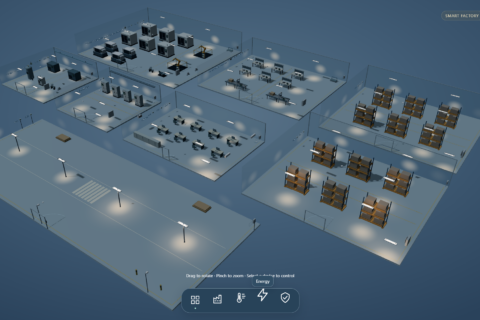
Smart Factory Solution: Production, Energy and Utilities
HAIOTS smart-factory solution across eight zones with nine case screenshots, energy submetering, equipment monitoring, 26 product and interface items, and acceptance checks.
-
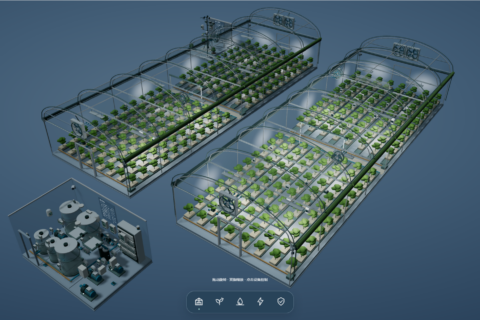
Smart Greenhouse Solution: Climate, Fertigation and Equipment
A two-greenhouse HAIOTS design example with nine interface screenshots, climate and irrigation workflows, 17 equipment and interface items, and acceptance checks.
-
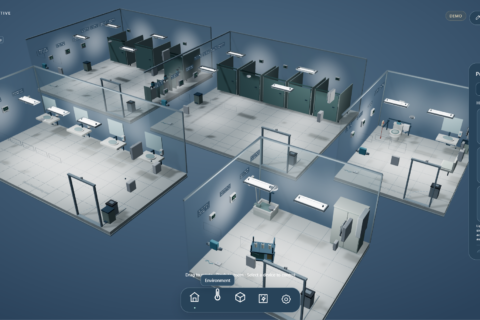
Smart Public Restroom Solution: Environment, Stalls and Cleaning
HAIOTS five-zone public restroom design example with nine interface screenshots, anonymous stall status, environment, leak alerts, cleaning workflows and 19 equipment items.
-
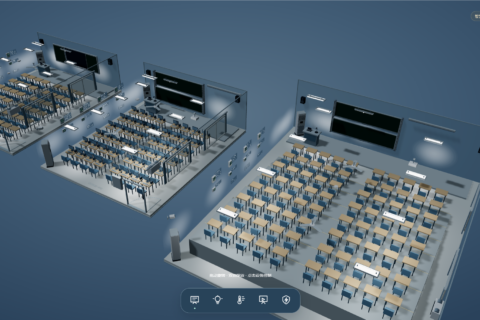
Smart Classroom Solution: Scenes, Environment and Device Management
A HAIOTS design example for standard, multimedia and lecture classrooms, with eight interface screenshots, scene workflows, 18 equipment items and acceptance checks.
-
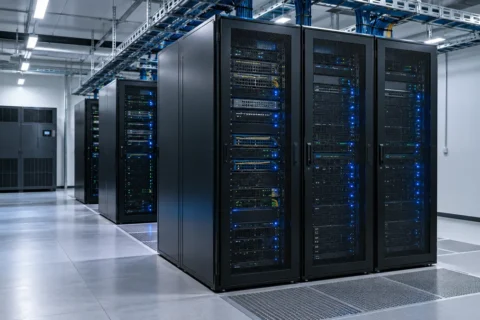
Smart Server Room Monitoring Solution: Environment, Power and Alerts
A six-rack HAIOTS design example covering inlet temperature, leaks, UPS, cooling, distribution and doors, with 21 equipment items and acceptance checks.
-

Smart Postpartum Care Center: Rooms, Care Services and Facility Management
A 20-room HAIOTS design example covering room environments, lighting, curtains, HVAC, service calls, leak and refrigeration monitoring, with architecture, 27 equipment items and handover checks.
-
Modbus Protocol Explained: RTU, TCP, Registers, and a Frame Example
Learn how Modbus RTU and TCP differ, how coils and registers are addressed, and how to read a device response from a sample frame.
-
HADTUSCAN User Guide: Portable Configuration Tool for LAN DTUs
HADTUSCAN (shown as HAIScan inside the app) is a no-install configuration tool for DTUs and network modules on a local network. It discovers devices over UDP broadcast and pushes IP / mask / gateway / DNS / hostname, and also supports mDNS scanning for Home Assistant / ESPHome. This guide covers requirements, quick start, the interface, scan troubleshooting, the PIN rule and OTA updates.
-
How to Use an External Model with the HA Voice Assistant
By default the voice assistant answers with the conversation agent built into Home Assistant. To use an external model such as DeepSeek or OpenAI, install the LTCN AI Conversation integration, enter your API key, and switch the assistant’s Conversation agent over — three steps, no config files.
-
System Update Guide for the Lite Xiaozhi AI Voice Speaker
Say a few words and let Xiaozhi check and upgrade itself, or open Home Assistant and update from the device page — both routes bring the firmware to the latest version.
-
Binding and Setup Guide for Lite Xiaozhi AI Voice Speaker
Take the MCP endpoint address from the Xiaozhi console, register it on the HAIOTS platform, then add it in Home Assistant with LTCN AI — three steps, and no configuration files to edit.
-
Common Voice Commands and Feature Guide
The most-used Xiaozhi AI voice commands grouped by scenario — controlling devices, checking on your home, running a whole routine in one sentence, creating by voice, editing and organising, calendar and announcements, system updates and troubleshooting — plus the capability behind each one.
-
Out of the Box | HAI Series Host Getting Started Guide
Once your HAI series host arrives, scan the “Scan to manage” QR code on the label: claim the device, create an account and bind the host in three steps. The guide also covers the data plan, managing several hosts under one account, remote and LAN access, and the device label specifications.
-
LTCN AI Desktop Assistant Guide: A Desktop Voice Assistant for Home Assistant
LTCN AI Desktop Assistant is a Windows desktop voice assistant that connects natural conversation, Home Assistant and real-time speech. This guide covers the five-step first-run setup with screenshots, voice commands and troubleshooting.
-
How to Control Home Assistant Devices with Xiaozhi AI Voice: Beginner Tutorial
Install MCP Server for Xiaozhi in Home Assistant (HA) via HACS, then add the MCP Server for Xiaozhi integration (hosts shipped after April 2026 already have this step configured).
-
Multiple Ways to Create a One-Tap Lights Off Button in Home Assistant (HA): Beginner Tutorial
The benefit is that you can group all your lights together, and from then on you only need to control this group to control all the lights at once.
-
How to Integrate a Nest Thermostat with Home Assistant: Beginner Tutorial
Integrating Nest is one of the most tedious integrations in Home Assistant and requires a VPN, because Google enforces very strict security verification.
-
How to Clear or Delete Sensor History in Home Assistant and Free Up Disk Space: Beginner Tutorial
In recent versions, Home Assistant renamed the former Services to Actions. Please note this interface change.
-
How to Integrate a Skyworth TV with Home Assistant: Beginner Tutorial
Since Skyworth TVs mainly run Android TV, the most recommended, most stable and most beginner-friendly way to integrate them with Home Assistant is the official Android TV Remote integration.
-
How to Announce Sensor Data via TTS in Home Assistant: PM2.5 Values and Advice
A detailed beginner tutorial based on Home Assistant 2025.12.x features, showing how to announce sensor data such as PM2.5 values or advice via TTS using the standardized tts.speak action, Jinja2 templates and YAML automations.
-
How to Add and Use Sonos Speakers in Home Assistant: Discovery, Dashboard and TTS
A detailed tutorial for adding Sonos products on Home Assistant 2025.12.2+. The content has been verified against the latest version logic, so even beginners can complete the configuration smoothly.
-
How to Add and Use Tuya Devices in HomeAssistant: Official Cloud Integration and Tuya Local
There are two main ways to add Tuya devices to HomeAssistant: the official Tuya integration (cloud-based, the simplest) and Tuya Local (local control with fast response but slightly more involved setup). This beginner tutorial is based on HomeAssistant 2025.12.2.
-
How to Add and Use a Samsung TV in Home Assistant: Local Network and SmartThings Cloud
A Samsung TV integration tutorial based on Home Assistant 2025.12.2+ and written especially for beginners, covering local network control and smart control via the Samsung SmartThings cloud.
-
How to Add a Hikvision Camera to Home Assistant for Surveillance via ONVIF
For HomeAssistant (HA) 2025.12.2 and later, the best way to add a Hikvision camera is not the old Hikvision integration but the ONVIF protocol, which gives you live video and motion alarms.
-
Thread Border Router After Adding a HomePod Mini in Home Assistant: How to Use It
In Home Assistant (HA), after you add a HomePod Mini the system often pops up a newly discovered item called Thread. Here is what it is and how to use it.
-
How to Add a HomePod Mini in Home Assistant for TTS Voice Announcements
Using a HomePod Mini as a voice player in Home Assistant (HA) is essentially treating it as a DLNA/AirPlay media player.
-
How to Use Scripts in Home Assistant: A Plain-Language Guide
A plain-language explanation of Scripts in Home Assistant (HA), plus a step-by-step guide to building a practical Movie Mode script.
-
Home Assistant Blueprints Explained: The Easiest Way to Configure Smart Home Automations
HomeAssistant’s Blueprints feature is a magic tool that makes smart home configuration easy. Here is a detailed explanation and tutorial based on Home Assistant 2025.12.2, covering how blueprints work, the built-in motion-activated light example, and how to import community blueprints.