

After the HAI series host arrives, these five steps get you running: scan the code to open the HA backend, use the account details we send you, check the data plan, attach the host to your account for central management, and finally the remote and LAN addresses.
Scan the code to open the HA backend
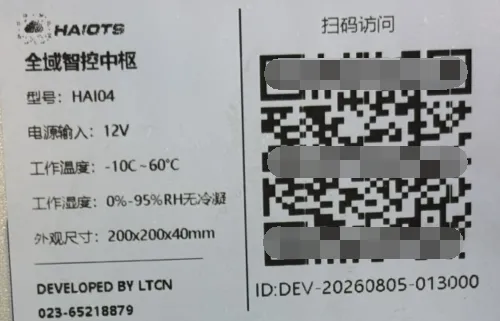
Scan the QR code on the bottom of the device to open the HA backend directly.
admin
Host details we send before shipping
Before shipping, we send you the following host details:
https://hms.smrte.cnxxxxx (as per the details actually sent to you)xxxxx (as per the details actually sent to you)xxxxxxxxxxThese four items are sent to you together with the shipment.
About the data plan
We include 100MB of data every month. Our data cost is CNY 0.8 per GB, and you can top up as much as you need.
Several hosts, one account
Your future hosts can all sit under this account so you can manage them in one place — or you can open a separate account instead.
Remote access and the LAN address
The encrypted external address of this host (you can also look it up after signing in to the management account):
https://xxxxxxxxx.hms.smrte.cn
The LAN address can be searched, viewed and changed with the tool we provide (the host and your computer must be on the same local network). You can also find it like this:
- Open the host through the external address and sign in to the HA backend
- Go to Settings → Network
- Open Network adapters to see the LAN address
Both addresses open the same host: use the encrypted address from outside, and switch to the LAN address once you are back on the same local network — it is faster.
Appendix: HAI04 host specifications (device label)
| Model | HAI04 |
|---|---|
| Product name | All-domain smart control hub |
| Power input | 12V |
| Operating temperature | -10℃ ~ 60℃ |
| Operating humidity | 0% ~ 95% RH non-condensing |
| Dimensions | 200 × 200 × 40 mm |
| Developed by | DEVELOPED BY LTCN |
| Phone | 023-65218879 |
Next
Once the host is up and running, going through the common voice commands will make day-to-day use much easier: Common Voice Commands and Feature Guide →

